
Bluegate 4kva Line Interactive Pure Sine Wave Ups

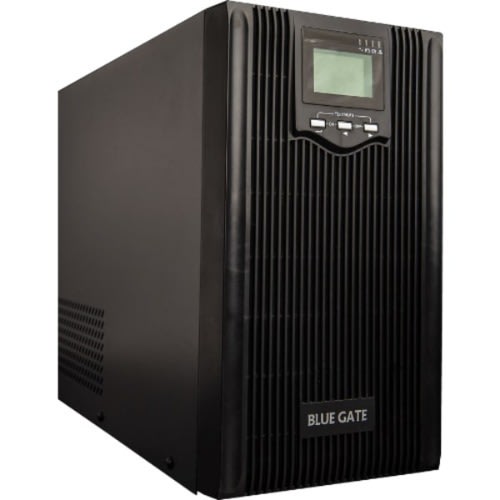
Bluegate 4kva Line Interactive Pure Sine Wave Ups

Bluegate 4kva Line Interactive Uninterrupted Power Supply (Ups) Has More Capacity To Meet Your Bigger Load Requirement. With The 4va Bluegate Ups, You Are Looking At Backup Time Of Over Half An Hour – Enough Time To Tidy Up Your Work And Get It Saved Up.
The Blue Gate Ups Is Capable Of Supporting A Set Of Office Devices Or Some Home Appliances.
Applications: Desktop Computers, Workstations, Printers And Other Equipment Within Its Capacity. At Home, It Can Support Your Televisions, Music System, Decoder, Pcs, Internet Modem, Etc.
Endeavour To Charge It At Least 7 Hrs On A Stable Power Supply Before Use First Time.
Please, DO NOT OVERLOAD BY MAKING SURE THE POWER RATING OF YOUR APPLIANCES IS NOT MORE THAN 3200 WATTS. At best, let your load be at 80% of the capacity of this UPS (2560W) and don't drain the battery to 0%. When there is a power outage, change to another power source as soon as possible but where it isn't possible to do so quickly, don't allow battery of this UPS to drain below 20% before shutting it down.
TECHNICAL PARAMETERS
Microprocessor-based Digital Control
Wide Input Voltage and Frequency Range
Pure Sine Wave Output Waveform - safer for equipment)
Self detection of input Frequency
Battery Self Diagnosis
Full AVR Function
Switch ON and OFF Automatically
Humanized Audio Alarm
Full Protection against Overload, Short Circuit, etc
High Speed of In-phase transfer
No Load Shut off function in Inverter mode (optional)
Intelligent Communication Ports Available (RS232/USB/SNMP optional)
NOTE: Charge for a minimum of 6hrs before first time use.
NOTE AGAIN: TO SWITCH THIS UPS ON, HOLD simaneously the "On" and "test" (the "test button" is the middle button before "of") for 5seconds and you will hear a beep,. When this UPS is plugged to electricity, the display should show you "line" BUT when there is no power supply or power outage, the display shows "BATT".
TO SWITCH IT OFF this UPS, pess " on" and hold simultenously the "ON" " test" (the button between "on" and "off) simultaneously for 5 seconds and the display should show " PWRDN". Note that in this mode, the ups is on bypass mode and will still work until the electric supply to it is switched off or power outage. Read these instructions again.
Most Sellers don't know these simple technicality and it causes battery and life of the UPS to drain fast if you only Press "ON" button only when you want to switch it off.
Note for the third time: NEVER turn this UPS on by just pressing the "on" button only XXXXXXX
Any other seller that posts these technicalities I just shared copied it here! We know the product we are selling and we want to satisfy you 100%. Our joy iwould be that you use it for years and not call us for any issues. That is why we explained this product for you.