
Q7 Wireless Wifi Spy Hidden Camera Mini P2p Video Recorder Dvr

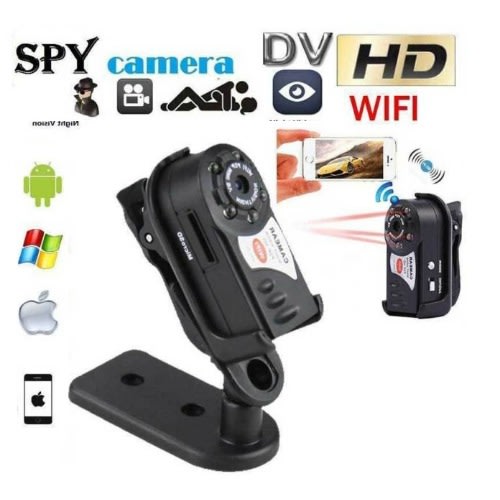

Q7 Wireless Wifi Spy Hidden Camera Mini P2p Video Recorder Dvr

Features:
- Pocket Camera Recorder: The mini camera is world's smallest wifi camera,and fit for all kinds of portable tools.
- Support system: Windows, ISO, Android. More Practical: Connecting to mobile phone/tablet directly by searching camera's WiFi signal. You could watch video from camera in time. No need WiFi router to transmit
- Video Recorder: The Mini security DVR with Remote Control,Support recording and charging at the same time,Support 32GB micro TF Card in Max (Not included)
- Wi-Fi Connection: This Camera have own their self WiFi,the WiFi name is"Q7" or "HD-Q7";WiFi distance about 40m ,Pass word management to protect your privacy,Real-time Video Recording
- Strong Function:This is a HD mini DV camera,Built-in microphone,Support real-time video recording,IR night vision(with 5 LED IR night vision),snapshot,audio recording
The name of the WIFI/P2P network camera
AVI video format
M- JPEG video coding
Remote video resolution 640*480 VGA
Network transmission resolution 320*240 QVGA
Video frame rate of 15fps + 1fps
1/3" color CMOS sensor;
Antenna 2.4G 802.11n WIFI built-in antenna
Storage support TF card, can be extended to 32G
Playing with or mainstream audio and video playback software operating system
Image ratio 4:3
Support system Windows ISO Android
Charging voltage DC-5V
Battery type high capacity polymer lithium battery
1*Main Body(withot TF card)
1*Mount
1*Sucker
1*Strap
1*Cable
1*Card Reader
1*Manual
How to use:
Please download the APP Software
This Camera have own APP Software,the software name is "9527", you should download and install in your phone.
(Or scan the two-dimensional code on the box to download)
Connect the Camera
About view the real-time video, it has 2 ways,the one is short range viewing via connect the camera's wifi "Q7"
Other one is long range remote viewing via connect your local WiFi.
This camera's WiFi effective distance is about 40m,if out of this range,you should use long range remote viewing
Short Range Connect WiFi Step:
1.Open the camera in the start working status (Work light indicator: Red light is lighting and blue light flashing)
2.Open the "Wi-Fi" or "Wireless Network" in your phone"Settings", find the camera's wifi "Q7" click it and connect the Wi-Fi "Q7" (Wi-Fi Password : 12345678).
3.When successful connection,Open the APP software "Plug&Play" in your phone.
4.Click the "Local Cameras" device,then you can see the video.
Long Range Connect WiFi Step:
1. Open the camera in the start working status (Work light indicator: Red light is lighting and blue light flashing)
2. Open the "Wi-Fi" or "Wireless Network" in your phone"Settings", find the camera's wifi "Q7" click it and connect the Wi-Fi "Q7" (Wi-Fi Password : 12345678).
3. When successful connection,Open the APP software "Plug&Play" in your phone.
4. Click the "Local Cameras" device,click the"Setting wireless network" -- Enter your local Wi-Fi's name and password.
5.When setting the P2P successful, the camera will restart again
6.After,Click the APP software "Plug&Play" to login,Click the "My Cameras"input the camera's ID number and password (the ID and password at the back of the camera body). then you will see the video.